
We have all watched a shiny robot kit sit unopened while the cardboard box becomes a fort. The truth is, STEM learning sticks when we match tools to a child’s curiosity, not to a trend. That is why this guide is organized by age and anchored in what kids actually do at the table, on the floor, and in the backyard.
Our goal is simple. Help you choose kits and tools that get used on day one and again next week. The best picks spark a feeling of “I can try that” within minutes, offer clear next steps, and survive being dropped, chewed by ideas, and sometimes by the dog.
A good STEM path grows with your child. In the early years, we want big pieces, quick wins, and sensory-safe exploration. By 5 to 7, we lean into simple mechanisms and if-then logic. By 8 to 10, we add design challenges and data. From 11 to 14, we look for real-world projects, version control for code, and parts that integrate with what you already own.
When we evaluate kits, we look at concrete things. Time-to-first-win under 10 minutes. Durability of parts and how they store. Instructions that move from guided steps to open challenges. Reusability of components across multiple builds. Safety and supervision needs. Device or app reliability if screens are involved. We also watch for the pitfalls. Some kits demand long prep from adults or rely on flaky apps. Others are wonderful but too fiddly for small hands.
Do this first. Spend two minutes watching your child play today. Count how often they narrate stories, build towers, sort objects, or take things apart. That tiny snapshot tells us more than any bestseller list.
Begin with your child, not the hype
Spot their play patterns
Kids broadcast what they are ready for. Builders stack, balance, and compare sizes. Tinkerers press buttons, flip switches, and ask what happens if. Storytellers line up figures and give them jobs. Collectors sort by color or category. During your two-minute watch, jot one thing: what they do when a piece falls over or a plan fails. Do they try again, ask for help, or pivot to something new? That response will guide how much scaffolding to choose.
Map interests to STEM domains
Interests translate into STEM entry points. Dinosaurs and rocks invite early geology and measurement. Baking leans into chemistry and ratios. Trains suggest motion, magnets, and simple circuits. Drawing or origami supports geometry and spatial reasoning. Video game love can become sequencing, debugging, and simple coding. We are not forcing a track. We are using what already lights them up.
Readiness signals and constraints
Look for practical signals. Can they follow two-step directions? Hold small parts without frustration? Read simple symbols or words? How long can they focus before a short movement break? Note your home constraints too. Limited table space favors compact kits with built-in storage. Sensitive ears need quiet mechanisms over buzzing motors. Younger siblings and pets mean larger pieces and secure containers. These details prevent regret later.
Choose STEM kits that get used again and again
What predicts repeat play
Three traits correlate with use beyond the first build. Open-ended parts that reconfigure into many models. Tiered challenges that move from copy-the-picture to design-your-own. Fast feedback, like a light turning on or a mechanism moving within minutes. Add in practical checks. Pieces that survive drops. Clear visuals in the manual. Minimal adult-only setup. If an app is required, it should work offline or have a stable, well-reviewed update history.
A quick two-minute pretest
Before you buy, run a tiny trial with household items. For engineering, give them paper, tape, and a book. Can they build a bridge that holds the book for 5 seconds? For circuits, use a flashlight and talk through where the power flows from and to. For coding logic, play a simple arrow game on the floor. They “program” you with three moves to reach a pillow. Watch for joy and persistence. If they light up, a kit in that lane will likely land.
Limits and edge cases to plan for
Some great kits are still the wrong match. Tiny fasteners frustrate kids with developing fine motor skills. Loud gears can bother sensory-sensitive learners. Glue or paint-heavy projects stall in homes where cleanup is a battle. App-dependent robots falter when a family device is locked down. None of these are deal-breakers. They just mean we choose bigger parts, quiet mechanisms, low-mess builds, or screen-optional options in the same theme.
Quick Comparison
| Product | Best for | Biggest strength | Biggest trade-off |
|---|---|---|---|
| Learning Resources Pixel Art STEM Kit (402 Pieces) for screen-free creative play | Screen-free creative pattern play. | Lots of pieces for open-ended designs. | No electronics or coding depth. |
| Root Viewer Kit — Watch roots grow (ages 4–8) | Early biology and nature observation. | Kids can watch roots grow in real time. | Requires time and careful upkeep. |
| Learning Resources STEM Explorers Machine Makers 60-Piece Set — Build Simple Machines (Ages 5+) | Hands-on intro to simple machines. | Builds multiple mechanisms with one set. | Models can be small and fiddly. |
| Learning Resources STEM Explorers Suncatchers 433-piece build-your-own kit for ages 5+ | Light, color, and pattern exploration. | Big piece count suits group builds. | Storage and cleanup take effort. |
| Learning Resources STEM Explorers Marble Runners – 18-piece marble run set for ages 5+ | Quick cause-and-effect challenges. | Fast setup for instant testing. | Limited pieces cap complexity. |
| Doctor Jupiter My First STEM Pixel Art Kit – 100+ pixel‑art challenges that teach coding basics | Unplugged coding logic through puzzles. | 100+ challenges sustain practice. | Stays in 2D logic, not robotics. |
| Learning Resources Coding Critters Go Pets: Dipper the Narwhal – Screen‑Free STEM Coding Toy (Ages 4+, 14‑Piece Set) | Preschool sequencing and early coding. | Cute theme keeps kids engaged. | Learning depth fades after basics. |
| Learning Resources STEM Explorers Bridge Builders — 72-Piece STEM Bridge Kit for Ages 5+ | Bridge design and strength testing. | Encourages iteration and redesign. | Needs table space for long spans. |
| IQ BUILDER STEM Construction Set for Kids Ages 5+ | Free building across ages 3–10. | Flexible parts spark creativity. | Minimal guidance for beginners. |
| Learning Resources STEM Explorers Domino Action – 59-Piece Chain-Reaction Set for Ages 5+ | Cause-and-effect and patience training. | Satisfying chain reactions reward planning. | Setups topple with minor bumps. |
| Learning Resources STEM Explorers Motioneering 56-Piece Motion-Building Set (Ages 5+) | Exploring motion with wheels and axles. | Solid intro to kinetic ideas. | Fewer specialized parts limit depth. |
| Botley Coding Robot Kit – Screen-Free Coding for Ages 5+ | Foundational coding with a friendly robot. | Programmable sequences without screens. | May need adult help to start. |
1. Learning Resources Pixel Art STEM Kit (402 Pieces) for screen-free creative play
Best ages 4-7

Perfect for kids 5+, the STEM Explorer Pixel Art Challenge combines fun math and coding puzzles to keep young minds engaged and developing critical thinking skills.
$19.79
Price and availability are accurate as of 09/21/2026 09:32 pm GMT and are subject to change.

If your child loves patterns, colors, and puzzles, this is a great first step into structured STEM thinking. It’s best for ages 5 to 7 and for families who want screen-free play that still nudges early math and coding concepts. We like it for short, repeatable sessions after school or weekend mornings.
It aligns with the buying guide criteria of “will they actually use it” because wins come fast. Kids see a picture take shape as they count, map, and place pieces. That immediate feedback keeps them coming back, and we can dial difficulty up by choosing more detailed designs.
The trade-offs are clear. There’s no electronics, sensors, or moving parts. It’s not for kids who want flashy builds or experiments. And with 402 pieces, you’ll want a tray or zip bags for tidy storage.
If you care most about screen-free logic practice and creative focus, pick this. If you want robotics, motion, or chemistry, save this for a later add-on and look to a different category first.
2. Root Viewer Kit — Watch roots grow (ages 4–8)
Best Recommended Starter Pick

Explore the hidden world of plants with the Root Viewer! Perfect for kids to grow, track, and learn indoors. A fun, educational gift for young gardeners.
$16.99 Was $21.99 Save 23%
Price and availability are accurate as of 09/22/2026 06:40 am GMT and are subject to change.
This is a gentle on-ramp for ages 4 to 8 who love to check on things and notice small changes. It suits families and classrooms looking for an indoor, low-tech way to explore living systems. If your child enjoys drawing what they see or asking why things grow, this kit fits that temperament.
It nails our buying guide criteria for engagement over time. There is a clear daily routine, built-in reasons to measure and sketch, and a story that unfolds at kid pace. You can introduce simple comparisons, track height over days, and build language around parts of a plant without needing screens or complex setup.
The trade-offs are speed and maintenance. Growth is not instant, and you will need a sunny spot and a light watering habit. It is also less about building and more about watching, so action seekers may lose interest unless you pair it with quick hands-on activities.
If you care most about nurturing patience, observation, and a daily science habit, choose this. If your child needs fast feedback, pair it with a one-evening experiment and use the Root Viewer for the slow, satisfying arc.
3. Learning Resources STEM Explorers Machine Makers 60-Piece Set — Build Simple Machines (Ages 5+)
Best Early physics pick

Turn playtime into problem-solving: kids 5+ build real-world machines, tackle 9 STEM challenges, and learn physics and engineering while they tinker. Curious? Explore more.
$16.99 Was $25.99 Save 35%
Price and availability are accurate as of 09/21/2026 06:02 pm GMT and are subject to change.
This set fits kids 5 to 7 who like to tinker and figure things out with their hands. It is a good pick for families who want quick, low-prep builds that still teach real concepts. With 60 pieces and 9 challenges, there is enough structure for new builders and enough freedom for creative twists.
It hits our key criteria for early learners: clear goals, fast wins, and repeatable play. The guided challenges give kids a starting point while the open-ended pieces invite modifications, so it grows with confidence. Short build times make it easy to use between homework and dinner.
The trade-off is depth. It focuses on basics, so older or advanced kids may outgrow the challenge curve. Early readers may need us to read the prompts aloud, and the loose parts mean we should plan a storage bin to keep it in rotation.
If you care most about structured learning, start with one challenge at a time and ask your child to explain how their machine works. If you care most about creativity, skip the prompts and set a simple goal like “move a small object from here to there,” then iterate together.
4. Learning Resources STEM Explorers Suncatchers 433-piece build-your-own kit for ages 5+
Best Screen-free creativity

Screen-free STEM fun: build and rebuild sparkly suncatchers with 400 pieces and 3 frames. 30+ projects boost early math, coding, and problem-solving.
$19.99
Price and availability are accurate as of 09/22/2026 02:44 am GMT and are subject to change.
If your 5 to 7 year old loves making things look beautiful and you want that to count as STEM, this kit fits. It is hands-on, screen-free, and invites kids to build and rebuild. The 30 plus projects are a good bridge for early learners who need clear prompts but still want to create something unique.
From our buying guide criteria, it nails quick wins and replay value. The structured prompts model patterning and sequencing, which are the building blocks of unplugged coding. Early math shows up naturally through counting pieces, comparing shapes, and mirroring patterns. With three frames, siblings can work side by side without waiting for a turn.
Trade-offs: projects stay mostly 2D, so it will not scratch the itch for motors, gears, or circuits. The sparkle relies on light, so plan a window spot to enjoy the results. There are many small pieces, which makes it less friendly around younger siblings.
If you care most about creativity, low prep, and skill-building that feels like art, choose this. If you want mechanical problem-solving or deeper engineering challenges, pair it with a simple build kit that adds moving parts later.
5. Learning Resources STEM Explorers Marble Runners – 18-piece marble run set for ages 5+
Best Mess-free starter pick

Hands-on marble run fun: kids build, test, and tweak through 10 STEM challenges. Reusable cling pieces mean no mess—perfect for sparking critical thinking.
$17.99 Was $20.99 Save 14%
Price and availability are accurate as of 09/22/2026 03:18 am GMT and are subject to change.
If you want a first marble run that gets used right away, this 18-piece set is a smart pick for ages 5 and up. The built-in 10 STEM challenges invite kids to build, test, and tweak, so they learn by doing without feeling like it is a lesson. The reusable cling pieces help keep the experience tidy, which matters when play happens at the kitchen table.
It nails a few key buying-guide criteria: fast setup, guided prompts that spark critical thinking, and a clean finish. Short sessions work well here. Kids can complete a challenge, adjust a piece, and see instant cause-and-effect feedback.
The trade-off is scope. With fewer parts, you will not get towering contraptions or long runs, and confident builders might crave more variety. If you care most about open-ended mega builds, look for a larger marble run. If you care most about low-mess, quick wins, and structured challenges that build grit and iteration habits, this is the sweet spot.
6. Doctor Jupiter My First STEM Pixel Art Kit – 100+ pixel‑art challenges that teach coding basics
Best Screen-free coding starter

Screen-free STEM fun for ages 5+: 100+ pixel art challenges build coding basics, symmetry, and early math. Clear instructions, no mess. Worth a closer look.
$14.99
Price and availability are accurate as of 09/22/2026 01:02 am GMT and are subject to change.
If your child loves puzzles, patterns, and drawing, this is an easy win. We like it for early elementary learners and for families who want screen-free STEM time that still feels modern and playful. The pixel-art format makes abstract ideas like sequencing, symmetry, and grid thinking click without a tablet in sight.
It also nails core buying-guide criteria: quick setup, clear instructions, and truly low mess. It’s the kind of kit you can pull out for a short session and actually put away without drama. The 100+ challenges give you plenty of mileage, and the structure makes it simple for grandparents or sitters to guide without prep.
Trade-offs are real. This teaches logic foundations, not real programming syntax or robotics. Kids who crave tinkering with motors, sensors, or code might want more. If you care most about screen-free logic and early math, start here. If your priority is typing code or building machines, pair this with an entry-level coding app or beginner robotics kit down the road.
7. Learning Resources Coding Critters Go Pets: Dipper the Narwhal – Screen‑Free STEM Coding Toy (Ages 4+, 14‑Piece Set)
Best Screen-free coding starter

Meet Dipper the Narwhal—an interactive, screen-free way to spark coding. Kids code her to follow black-line paths and solve storybook challenges for logic skills.
$29.36
Price and availability are accurate as of 09/22/2026 12:53 pm GMT and are subject to change.
If your child is 4 or 5 and lights up at animals and stories, this is a gentle on-ramp to coding ideas without a tablet. Dipper follows black-line paths and uses simple storybook prompts to nudge kids into sequencing and problem solving. It suits families who want quick, screen-free sessions that fit between snack time and bath time, and it does well in smaller spaces thanks to the tidy 14-piece set.
From our buying guide criteria, it nails fast setup, clear feedback, and play that invites you to sit alongside your child. The story challenges help you gauge readiness with a five-minute test of “can we make Dipper go from here to there.” If your child enjoys mapping routes and pretending, you will get reliable engagement.
Trade-offs are real. The focus stays on line following, so it will not satisfy kids who crave building elaborate contraptions or complex coding steps. If you care most about a calm, screen-free start that builds confidence and logic, pick this. If your child is already zipping through puzzles or wants to design and build, plan to step up to a more open-ended engineering or coding kit later.
8. Learning Resources STEM Explorers Bridge Builders — 72-Piece STEM Bridge Kit for Ages 5+
Best Great for early engineering

Hands-on STEM kit: kids design, build & test bridges and towers to learn engineering basics, problem-solving, and creative thinking. Ages 5+. Tap to learn more.
$19.26 Was $23.99 Save 20%
Price and availability are accurate as of 09/22/2026 02:57 am GMT and are subject to change.
If your child is 5 or up and loves to build, this is a friendly first step into real engineering. It invites kids to design, build, and test bridges and towers, which keeps the focus tight and the wins frequent. We like it for families who want a simple kit that turns playtime into problem-solving without screens or batteries.
It hits our buying guide criteria for early engineering: clear goals, quick set up, and instant feedback. Kids can try a build, see where it sags, and tweak. That test-and-improve loop is exactly what we look for at this age. It also fits short attention spans. Ten minutes is enough for a build-and-test cycle.
The trade-off is scope. It is about bridges and towers, not robots or electronics. If your child wants open-ended fantasy worlds, the theme may feel narrow. And older kids might run through the easier challenges quickly unless you add your own constraints like longer spans or limited pieces.
If you care most about real-world engineering habits, choose this and lean into the testing. Set simple challenges like longest span or strongest tower and keep a little notebook of results. If you care more about coding or motors, skip this and look at a different category.
9. IQ BUILDER STEM Construction Set for Kids Ages 5+
Best Open-ended creativity pick
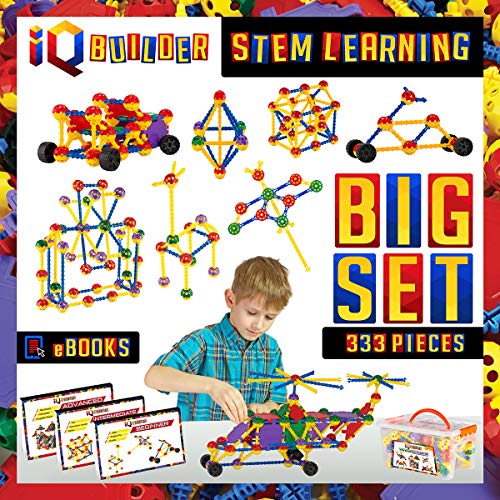
Hands-on STEM building fun that helps kids practice creativity, problem-solving, and engineering skills—great for curious minds ages 5+.
Price and availability are accurate as of 09/22/2026 07:16 am GMT and are subject to change.
If you have builders who love to tinker more than they love following instructions, this open-ended set fits well. It spans early preschool through about age ten, so siblings can build side by side without outgrowing it quickly. We like it for families who want a single kit that lives on the coffee table and keeps hands busy while brains work.
It nails a few buying-guide criteria: fast time to first build, high replay value, and easy collaboration. Kids practice creativity and basic problem solving every session, whether they are making creatures, vehicles, or towers. It is also a gentle way to boost early STEM thinking without screens or complicated rules.
The trade-offs are typical of open-ended kits. Some kids need a nudge to avoid aimless stacking, and younger builders may need help getting started. Expect loose pieces on the floor, so plan a bin or zipper bag for storage. If your child prefers step-by-step models, this may feel too unstructured.
If you care most about meaningful use, set quick challenges. Try 5-minute prompts like build something that rolls or make a bridge that holds a book. If your child wants more structure, pair the kit with simple challenge cards you write on index cards to guide their builds without losing the creative spirit.
10. Learning Resources STEM Explorers Domino Action – 59-Piece Chain-Reaction Set for Ages 5+
Best Screen-free physics play

Domino runs meet STEM: kids explore cause-and-effect, kinetic motion, and skill-building challenges that grow with them. Great for ages 5+.”””
$17.59
Price and availability are accurate as of 09/22/2026 02:04 am GMT and are subject to change.
If we want a low-barrier way to introduce physics to ages 5 and up, this domino set fits beautifully. It rewards curiosity fast. Kids see cause-and-effect in seconds, and the short build-reset cycle keeps them engaged without screens. It’s a smart pick for families who prefer quick, repeatable sessions after school or before dinner.
From our buying criteria, it nails instant feedback, open-ended play, and a clear path for skill growth. The challenges scale as coordination and patience improve, so ages 5–7 can start simple while older siblings experiment with longer runs and gentle curves. It’s also tidy and easy to store, which matters if we’re already juggling blocks and bricks.
Trade-offs are real. With 59 pieces, there’s a ceiling to how ambitious a run can be, and there’s no deeper coding or electronics layer. It also demands a steady hand and flat floor, so early mishaps can frustrate some kids. We plan for a calm setup zone and model resetting as part of the fun.
If we care most about cause-and-effect and building confidence, this is an easy yes. If our child dreams of room-spanning Rube Goldberg builds, we should expect to add more dominoes over time. If we want math or programming concepts, we’d pair this with a logic or coding kit later.
11. Learning Resources STEM Explorers Motioneering 56-Piece Motion-Building Set (Ages 5+)
Best Early Engineering Pick

Turn playtime into STEM wins—kids build a catapult, trebuchet, and windmill while boosting critical thinking. Includes 8 challenges. A fun gift to spark curiosity.
$20.99 Was $24.19 Save 13%
Price and availability are accurate as of 09/22/2026 03:17 am GMT and are subject to change.
If you’ve got a young tinkerer in the 5–7 range who loves cause and effect, this 56-piece motion set is a sweet spot. It gives kids a clear goal and an immediate payoff. Build a catapult, a trebuchet, or a windmill, then test, tweak, and try again. The eight included challenges help us guide a short session after school or on a rainy morning without doing all the thinking for them.
From our buying criteria, it nails quick wins and structured prompts. The builds are short, the results are visible, and there’s enough variety to keep interest up for several sessions. It’s a great match for kids who light up at moving parts, simple physics, and playful tests like making something go farther or spin longer.
Trade-offs are mostly about depth. Older or advanced kids will hit the ceiling after they work through the challenges, and launch-based projects may call for a grown-up nearby and a bit of space. If you want a kit that becomes an ongoing, months-long engineering sandbox, you’ll likely want to step up later.
If you care most about easy setup and guided challenges that teach iteration, grab this. If you’re aiming for deeper design freedom or coding later, think of this as a confident starter that leads into more advanced engineering or robotics kits down the road.
12. Botley Coding Robot Kit – Screen-Free Coding for Ages 5+
Best Beginner Robot 6–9

Spark your child’s creativity with Botley! A screen-free coding robot that makes learning STEM skills fun and interactive. Perfect for young problem solvers.
$65.45
Price and availability are accurate as of 09/22/2026 10:17 am GMT and are subject to change.
If your child is in the 5 to 7 range and you want coding without screens, this is an easy win. It works well for short, after‑school bursts and weekend challenges, and it fits families who want hands-on logic without adding more device time. We also like it for mixed-ability groups where the focus is simple sequences and clear cause-and-effect.
From our buying guide criteria, it nails quick wins and low-friction setup. Kids can see the outcome of their steps right away, which builds confidence and keeps them coming back. It also supports our recommendation to match tools to attention span: short instructions, immediate feedback, and playful exploration.
The trade-offs are about depth and space. It does not scale into complex programming concepts the way app-based robots can, and you’ll need a bit of floor or tabletop room to run activities. Highly driven 8 to 9-year-olds may outgrow it unless you keep inventing new challenges.
If you care most about screen-free logic and a friendly first step into coding, choose this. If your priority is long-term complexity and text-based coding down the road, consider starting with a platform that adds app control and layered challenges.
FAQ
Buying decisions
- How do we pick the right difficulty by age?
Start with the age band, then check three signals: reading level, fine-motor control, and attention span. Pick the easiest option that still feels a little challenging. For first projects, aim for 20–30 minutes for ages 3–7, 30–60 for 8–10, and 45–90 for 11–14.
For a related deep dive, see Start with the age band.
- Do we need screens for STEM learning?
No. Many great kits are fully screen-free. If an app adds value, keep sessions short, use guided modes, and pair screen time with hands-on building.
Setup and storage
- How much time and space do we need?
Use a baking tray or shallow bin as a mobile workspace and to corral parts. Plan clean starts and clean stops: set a timer, label sub-bags, and photograph builds so you can resume later.
Engagement and learning
- What if our child loses interest mid-kit?
Change the mode, not the goal. Try a 5-minute story prompt, a mini build challenge, or a quick show-and-tell. If it still stalls, pause and return tomorrow with a smaller step or a different kit style.
If we had to leave you with one idea, it’s this: start with your child, not the trend. Follow their curiosity, then choose tools that match their hands, attention span, and schedule. A good kit invites play today and leaves room to explore tomorrow.
Pick one path to try, not five. Run a five‑minute test, watch what sticks, and adjust. Rotate materials, keep builds visible, and turn small wins into weekly habits. The right fit looks like engagement without nagging and progress without pressure.
Decision recap in one minute:
- Ages 3–4: big pieces, hands-on cause and effect, open-ended play.
- Ages 5–7: simple builds, clear steps, early logic, playful testing.
- Ages 8–10: design challenges, data and measurement, small projects with real purpose.
- Ages 11–14: prototypes, coding or mechanics with goals, self-directed projects and sharing.
Action plan for the next week:
- Pick one interest signal from your child and choose a single kit or activity that matches.
- Set up a small maker zone with clear bins and a build tray.
- Schedule a 20 to 40 minute block and make it screen-free.
- Use a day-one challenge from below and stop while they still want more.
- Capture a photo and a one-sentence reflection. Post it where your child can see their progress.
- Rotate one variable next time. New material, new constraint, or a different test.
Edge cases to consider:
- If your child is far ahead or very focused, buy up a level but keep tasks bounded with clear outcomes.
- If your child is sensitive to noise or texture, favor smooth, easy-to-clean materials, predictable steps, and short cycles with breaks.
Your top questions, answered
What if my child straddles two age ranges?
Go by task fit, not the number on the box. If they breeze through instructions but tire during testing, blend levels. Choose a slightly advanced build, then keep the evaluation step simple. Or choose an age-fitting build with one advanced twist, like tracking time or weight.
How many kits should we start with?
One core kit and one replenishable material is plenty. Too much choice stalls momentum. When the first kit is used without prompting for two weeks, add a second category that complements it, like measurement tools alongside building parts.
How do we keep kits from gathering dust?
Make it easy to start and easy to stop. Store parts in a shallow bin with a lid that doubles as a work surface. Pre-bundle challenges on index cards. Aim for short sessions that end with a photo and a reset. Bring finished builds into daily life, like using a homemade ramp to launch toy cars.
Where do screens fit?
Screens can amplify, not replace. Under 7, use screens for capturing results or short how-to clips. Ages 8–10, try simple data logging or drag-and-drop coding with clear goals. Ages 11–14, use screens for research, programming, and sharing. Always anchor to a physical task or a real outcome.
How do we handle siblings of different ages?
Set a shared theme with different roles. For example, everyone builds bridges. The youngest tests which blocks roll across. The middle child measures span length. The oldest tracks failures and iterates the design. Shared theme, tailored tasks.
What about safety and mess?
Choose age-appropriate small parts. Keep sharp tools in a labeled box and teach a check-in rule. Protect surfaces with a reusable mat. Use trays to contain pieces. For messy experiments, set a time limit and a cleanup timer. Make cleanup part of the challenge.
Quick-start activities for day one
Ages 3–4: build, pour, sort
- Tower and tunnel: Stack blocks to make a tower, then a tunnel a toy car can roll through. Ask which stands longer and why.
- Sink or float: Use a clear tub with water. Test safe household items. Sort by sink or float, then try wrapping a sinking item in foil to change the outcome.
- Color roads: Tape paper strips on the floor. Sort cars or blocks by color onto matching roads. Count how many per road.
What to watch for: Do they repeat actions with delight, try a new angle, or narrate what is happening. That is early inquiry.
Ages 5–7: tiny engineer challenge
- Paper bridge test: Two books, a sheet of paper, a handful of coins. How many coins can a flat sheet hold. Now fold into an accordion. Which holds more.
- Marble maze: Use a shallow box lid and straws or tape to build a maze. Time three runs and record the best time.
- Pattern machine: Create a pattern with beads or buttons. Have your child teach you the rule. Then switch roles.
What to watch for: Willingness to tweak one thing at a time and use simple measures like count or time.
Ages 8–10: data in the kitchen
- Cooling curve: Pour hot water into a mug. Measure temperature every minute for ten minutes. Sketch the curve and predict minute eleven.
- Paper airplane trials: Design two plane types. Fly five times each. Track distance and adjust one feature, like wing angle.
- Light hunt: With a simple light meter app or a homemade shade scale, test brightness in five spots. Graph results and suggest where to put a plant.
What to watch for: Planning before building, recording data, using results to change the design.
Ages 11–14: prototype and pitch
- Cardboard automata: Build a simple motion device with a cam and follower from cardboard, skewers, and paper clips. Iterate for smoother motion. Film a 30 second demo.
- Survey and solve: Ask three people about a small problem at home, like tangled cables or snack storage. Prototype a fix with cardboard or printable templates. Collect feedback and refine.
- Paper circuits: Use copper tape, a coin cell, and an LED to make a light-up postcard. Add a switch with a folded tab and diagram your circuit.
What to watch for: Owning the process. Setting criteria, testing against them, and explaining trade-offs.
When you hit resistance
- Shrink the task. Five minutes, one variable, one photo.
- Change the constraint. Fewer parts or a silly theme like build with only circles.
- Switch roles. You build, they test and coach.
- End on a win. Leave the next step visible as an invitation.
You do not need a full lab or a perfect plan. You need a clear invitation, a right-sized challenge, and a rhythm you can keep. Start small, reflect out loud, and let each build point to the next.